


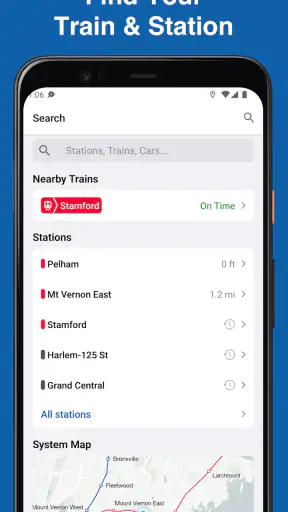
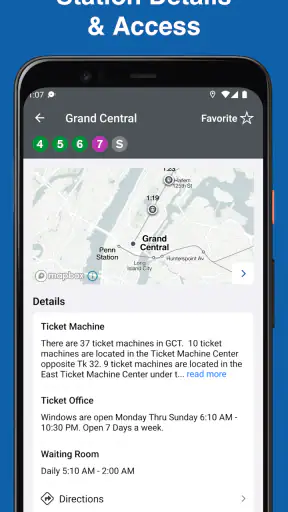
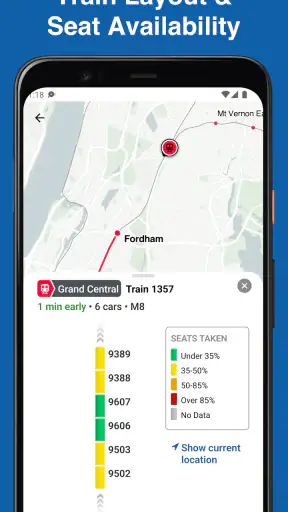
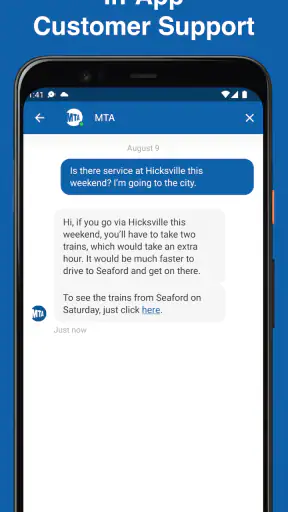
When I need to plan a trip on the Long Island Rail Road or Metro-North, I want a tool that stays focused on the train journey rather than trying to become an all-purpose travel platform. That is where MTA TrainTime makes sense. It is a free Maps & Navigation app from MTA, built around LIRR and Metro-North trips and tickets. After using it as a rail companion, I found it most useful when I already know my general route and need a practical way to organize the next part of the journey.
The app has a strong public-service feel because its purpose is narrow and easy to understand. It is not trying to replace every map, rideshare service, or city guide on your phone. Instead, it concentrates on two major commuter rail systems and the decisions that matter before boarding: choosing a trip, handling a ticket, and keeping the journey organized. That focus is its biggest strength, although it also tells you immediately who should not depend on it as a complete navigation solution.
A focused rail tool with a clear trust question
MTA TrainTime was released in June 2016 and is currently at version 10.13.0, with support beginning at Android 8.0. The app is rated for Everyone, costs nothing to download, and has passed the threshold of over a million installs. Its average rating is 4.6 from around 28 thousand ratings, with roughly 2.4 thousand written reviews. Those numbers suggest that many riders find it dependable enough to keep on their phones, but I would still treat popularity as context rather than proof that every trip will be smooth.
My first impression is that the app earns trust through its limited purpose. The developer is MTA, the organization associated with the rail services covered here, so the app feels more directly connected to the journey than a generic third-party timetable. That does not mean I would stop checking platform information or service notices in a station. Rail travel can change quickly, and a phone app should support good travel habits rather than replace attention to announcements and signs.
There is also a useful distinction between trusting an app for the task it is designed to handle and trusting it with every part of your travel life. I am comfortable viewing TrainTime as a rail-ticket and trip-planning tool. I would not use it as my only source for walking directions, local bus connections, airport logistics, or a complete door-to-door itinerary. For those jobs, a broader map app remains more suitable.
What the app is actually good at
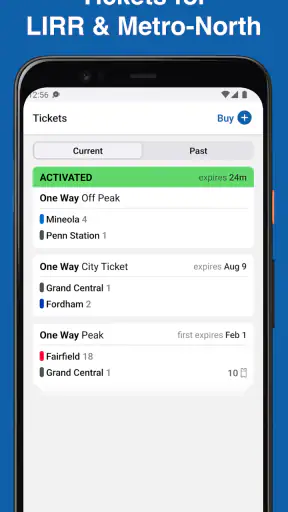
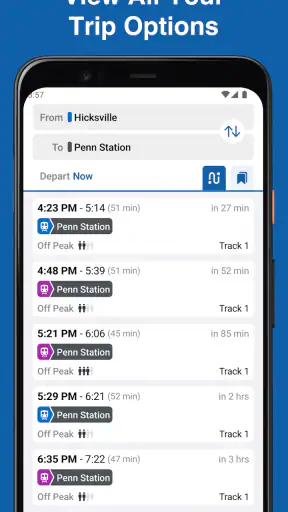
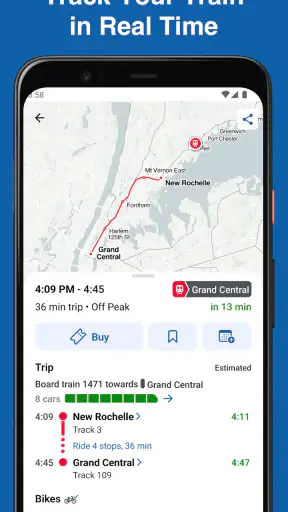
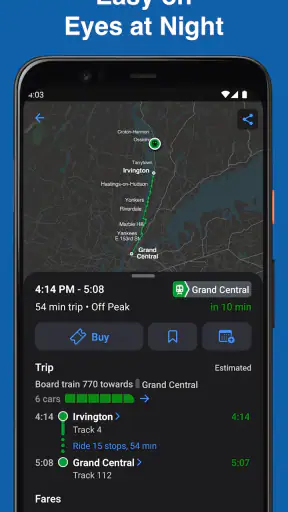
The central workflow is simple: select an LIRR or Metro-North journey, review the available trip information, and deal with the ticket side of the ride. That combination is more useful than a timetable that only tells me when a train is expected. In practice, the ticket part matters because it keeps the preparation for the journey in the same place as the trip search instead of forcing me to switch between a schedule tool and a separate purchasing process.
I especially like the separation between planning and traveling. I can think about the route before leaving home, then return to the same app when I am ready to board. That reduces the chance of searching for the same station details again under pressure. My practical advice is to prepare the trip while you have a stable connection and enough battery, rather than waiting until you are already moving through a crowded station.
The app is best for regular rail users, occasional visitors who understand which of the two systems they need, and anyone who wants a more direct alternative to searching the web for every train. It is less compelling for someone who rarely uses LIRR or Metro-North and only needs a broad city-navigation app. In that situation, a general map service may provide the walking, subway, bus, and driving context more conveniently.
Using it on an ordinary commute
Imagine leaving work later than expected and needing to get from Manhattan toward Long Island. I would open TrainTime to compare the available LIRR trips, check the route that fits my departure, and handle the ticket before heading to the platform. Once inside the station, I would still compare what I see on the app with the station board, especially if the train is close to departure or the station is busy.
That last step is not a criticism of this particular app so much as a sensible rail habit. A journey planner can show a useful plan, but the physical station remains the place where platform changes, boarding instructions, and last-minute announcements matter. TrainTime helps me make the decision; it does not remove the need to stay alert.
For a less frequent rider, the same scenario exposes a small trade-off. The app can make the rail portion clearer, but it does not automatically turn an unfamiliar neighborhood into a fully guided route. I would use a separate map for the walk to the station, confirm the correct terminal, and then let TrainTime handle the LIRR or Metro-North part. That two-app workflow is more realistic than expecting one product to do everything.
Tickets are useful, but preparation still matters
The ticket function is one of the reasons I would choose this app over a basic schedule page. Having the ticket and trip details connected can make the pre-boarding routine feel more orderly. It is also easier to review what I selected when the rail journey and payment-related step are part of the same experience.
My strongest practical tip is to avoid treating the ticket screen as something to discover at the last possible moment. Before leaving, I would check that the chosen trip matches the station I am actually going to, confirm that the phone has enough charge, and open the relevant screen before entering a place where reception may be inconsistent. These are simple precautions, but they reduce avoidable stress more effectively than repeatedly refreshing a schedule.
I would also be careful when plans change. A ticket workflow is convenient when the journey is straightforward, but a delayed train, an accidental station selection, or a sudden change of destination can make the process less obvious. In those moments, I would read the available instructions closely and ask station staff when the situation involves a rule or exception I do not understand. Convenience is valuable, but it should not encourage guessing about ticket validity.
Trust, visible choices, and personal data
For me, the trust question is not only whether the app shows a useful train. It is also whether I can understand what I am doing at each step. The clearest user choices are the ones directly connected to the task: selecting an LIRR or Metro-North trip, reviewing the journey, and managing the ticket process. I prefer that focused structure to an interface filled with unrelated recommendations or promotional distractions.
At the same time, I would not make broad claims about privacy or permissions simply because the app comes from a transportation authority. My cautious approach is to read the permission prompts and the app’s privacy information on my own device, particularly when installing it on a phone used for work, family, or sensitive travel. The important point is that trust should come from visible explanations and choices, not assumptions about the developer or the app category.
There are several moments when I become more data-sensitive. Buying or managing a ticket is one of them, because it is a transaction rather than a casual timetable search. I would review the details before confirming anything and avoid rushing through prompts. Account-related screens deserve the same attention: I would use a password I do not reuse elsewhere and check the available account controls instead of assuming that every setting is obvious.
Another sensitive moment is using the app while traveling. A rail app can reveal a great deal about where I am going simply through the trips I search for or tickets I manage. I would avoid handing an unlocked phone to someone else while a ticket or journey screen is open, and I would use the device’s normal lock and security settings. Those are user-side precautions, but they are important because an app can be trustworthy while the surrounding phone habits are careless.
Where it beats general alternatives
Compared with a general map app, TrainTime has a narrower but more relevant job. A map service is usually better for combining walking, subway, bus, driving, and rail into one broad itinerary. It may also be more comfortable when I am exploring an unfamiliar area. TrainTime becomes the better choice when the key question is specifically an LIRR or Metro-North trip and I want the ticket workflow close to that decision.
Compared with a plain web search, the dedicated app is more convenient for repeated use. I do not have to reformulate the same rail query every time, and the experience is designed around the two systems rather than a page of mixed results. The trade-off is that a website can sometimes be easier to access on a borrowed device or when I do not want another app installed. For a one-time visitor, that may matter.
Compared with relying only on station signs, the app gives me a way to prepare before I arrive. Signs and announcements remain essential once I am at the station, but they are not as useful when I am sitting at home deciding which trip fits my schedule. I see the strongest setup as a combination: use TrainTime for preparation and ticket handling, then use the station’s live information as the final in-person check.
Who should use it, and who should skip it
I would recommend it to commuters who regularly use either covered rail system, travelers who want to arrange the rail leg before reaching the station, and riders who prefer an official-purpose tool over a collection of generic search results. The free price removes an easy barrier to trying it, and the Everyone rating makes it suitable for a broad audience, including families planning a rail trip together.
I would be more cautious about recommending it as the only travel app for tourists with complicated multi-mode plans. If your day involves several subway transfers, local buses, walking through an unfamiliar neighborhood, and a rail connection, a general map app will probably be the better planning hub. You can still use TrainTime for the LIRR or Metro-North segment, but expecting it to manage the entire day would create unnecessary friction.
I would also skip it if you do not use those rail networks at all. Its specialization is valuable precisely because it does not try to cover every transit system. Installing it for a trip that never touches LIRR or Metro-North adds little value, while a broader navigation app would be more useful for ordinary city travel.
Small habits that make the experience better
My first habit is to search before I am in a hurry. I compare the trip options when I have time to read the station names carefully, because a rushed selection can turn a convenient tool into a source of confusion. This is particularly important for occasional riders who may recognize a destination but not the exact station used by the rail system.
My second habit is to keep the ticket step separate in my mind from the physical act of boarding. I make sure I understand what I purchased, then keep the phone accessible without leaving it exposed. If the journey changes, I do not assume that changing a search automatically changes a ticket. I look for the relevant action and follow the instructions shown in the app or ask staff.
My third habit is to use it as one part of a backup plan. I keep enough battery for the return journey, note the basic station and destination details, and pay attention to announcements. The app is most helpful when it reduces decisions, not when I treat it as a reason to stop making sensible preparations.
A fourth insight is that the app’s official focus can be both reassuring and limiting. It makes the rail workflow feel more direct, but it also means I should not judge it by features intended for a different kind of navigation product. The right question is not whether it replaces every alternative. The right question is whether it handles the LIRR or Metro-North portion of my journey more neatly than the alternatives I already use.
My cautious verdict
After using MTA TrainTime as a rail-focused companion, I see it as a practical choice for the specific problem it addresses. It brings LIRR and Metro-North trip planning together with ticket handling, and that is more useful than a generic search when I am preparing for one of those journeys. Its public-service identity and focused design give me a reasonable basis for trust, while the app’s narrow scope keeps my expectations realistic.
I would not call it a complete navigation replacement, and I would not rely on any phone screen without checking station information when circumstances are changing. I would also review permissions, privacy details, and account controls directly rather than making assumptions about how my information is handled. That cautious approach does not undermine the app; it is simply the right way to evaluate a tool involved in travel and transactions.
For a regular rider, the free download is easy to justify, especially when the alternative is repeatedly piecing together rail schedules and ticket steps from unrelated services. For a visitor with a complicated door-to-door itinerary, I would pair it with a broader map app. My recommendation is straightforward: use TrainTime for the rail decision and ticket workflow, but keep your own judgment, station information, and phone-security habits in the loop.


